
If you follow anyone on social media who covers AI, you’ve likely seen a few (hundred) mentions of Jev in the past few months, with many singing its praises. It’s typical for new AI model releases to receive a lot of attention, but in my short time using Jev for real-world projects, there’s a good reason why Jev has been getting its time in the spotlight.
Jev is an AI model by TypeSafe AI, a San Francisco-based artificial intelligence lab, built to do one thing and do that one thing very well: make fast decisions. As opposed to the LLMs we’re all used to, like the ones offered by Anthropic and OpenAI, that are built to provide human-like conversational text as their output, Jev receives structured input (like a JSON request) and returns structured responses based on the information fed to it.
This might not sound like a big deal, since you can also give services like Claude or ChatGPT instructions to make a decision based on the information given and return a structured response the same way Jev does. These services can also have specific API calls that ensure they return exactly this kind of structured response. So why is Jev considered so special when we already have tools that could provide the same functionality?
How Jev Compares to LLMs on Speed and Cost
Where Jev and similar decision-making models stand out is their speed and cost. Responses come back from Jev in milliseconds, and it costs so little that you probably won’t even notice it in your monthly AI usage bill. I was a bit skeptical of these claims at first but after testing it out on a few personal use cases, I can see why this model is so highly regarded when you need a quick decision or classification built into your applications.
I ran a few comparison tests, sending Jev and different LLMs a yes/no question and some context. For the example question, I provided a bug report that surfaced from an application I’m building called TestNod. Given the bug report, a stack trace, and the code that raised the exception, I asked the service if this bug should be classified as a high-priority bug or not.
When calling Jev to answer this question, it returned a response in under 200 milliseconds, at a cost of $0.00002. That’s not a typo. It really cost 1/500th of a U.S. penny. For these yes/no questions (a Noul, in Jev’s terminology), we get a score from 0 to 1, with 0 being a clear “no” and 1 being a resounding “yes”. In my example query, the bug was a minor issue that I felt was not urgent at all, and Jev seemed to agree with me, giving me back a score of 0.28, which leans toward a “no”.
To compare price and performance, I sent the same context and question to OpenAI’s GPT-6 Luna, which is one of the cheapest frontier LLMs available at the time of writing. I also had to give it specific instructions to match Jev’s structured response and score. It returned the same structured format with a score of 0.22, making it even closer to a “no” decision.
However, that’s where the similarities ended, as GPT-6 Luna took a little over 2 seconds at a cost of $0.0001, or 1/100th of a penny. That’s a 10x slower response and a 400% cost increase for about the same result. While it’s just fractions of a penny, these costs can add up quickly for companies that rely heavily on agentic decision-making capabilities in their applications.
The example I used for these early tests was a bit contrived, but I feel it shows how useful these services can be for many different use cases. For instance, a bug tracking service or code repository could implement a similar decision-making model and request to give developers quick feedback about an issue in their codebase.
Using Jev in a Rails Application
As I continued implementing Jev in different scenarios, I soon realized that its simplicity in doing one thing very well also makes it easy to set things up in a way that doesn’t make the most out of the service. As with any AI model, the output you get from it is only as good as the input you feed it. While Jev doesn’t require a lot of input, it does require a little more attention to the requests you make to it so you get the best possible result for your use case.
To see how a subpar Jev request leads to subpar results, let’s walk through the process I followed when creating a simple web application to help me get a more solid grasp of using the model.
I spun up a quick Ruby on Rails application centered around the concept of “Five Whys”. This technique is used to help drill down to the root cause of a particular problem by asking “Why?” to your original problem statement and any subsequent responses. It’s an effective tactic to figure out an issue, since it helps get through the different layers that can obscure the actual cause until we reach it.
The example app that I built (which you can play around with at https://fivewhys.dennmart.dev/) starts with you entering the problem you’re facing at this time, then asks you “Why?”. Every time you answer, it will ask you again and again until it determines that we’ve found the root of the issue and gives you some actionable next steps to take.
On the backend, the app waits until the third “Why?” response before calling Jev, so it has enough context to send to the service. It makes a request as a “yes/no” question (using the noul type in the request), which returns a probability value between 0 and 1. The app checks the probability score against a threshold of 0.75 to determine if we’ve found the real cause of the stated problem, or if we need to keep asking “Why?”. This score is a bit arbitrary and might yield false results, but I landed on it after experimenting and evaluating the scores that Jev returns for typical use cases.
To prevent an infinite loop of “Whys”, the app will stop asking after 10 tries of Jev not reaching the predetermined score threshold. It then makes a different request to Jev with the information gathered throughout the process, this time asking for a choice between different options to tell you why it couldn’t reach the root cause, such as going in circles or going off-track from the original problem statement.
Once Jev hits that threshold, the app sends the details to a separate LLM (in this case, GPT-6 Luna) to summarize and provide a list of next steps. The combination of using Jev as a quick and cheap structured decision maker and GPT-6 Luna for summarizing in a conversational, human way shows the benefit of using different AI models for different purposes, instead of trying to cram everything into a single model.
To show how surprisingly effective this combo is, I used the app to help me drill down into a real-world issue I dealt with recently. In an application I’m working on, a deployment to production failed when it timed out in the middle of the process. When asked why, it was because a database migration script took too long. Why did it take too long? Because there was a new migration that added a new index, which locked the table during deployment. And why was the table locked for so long? It’s because that specific table has over 50 million records.
Most developers would probably stop there and think that running this kind of database migration on such a large table is the root cause, but it’s not. So the app asks “Why?” once more. Turns out that the developer who added the migration script forgot to set a flag that makes the migration run in the background concurrently to prevent the table from being locked. With this last bit of information, Jev returned a probability value of this being the root cause with a score of 0.93, which is pretty close to a resolute “yes”. After sending the details to GPT-6 Luna, we have a few solutions to prevent this from happening again in the future. These suggestions were actually the same solutions that I had recommended the team follow.
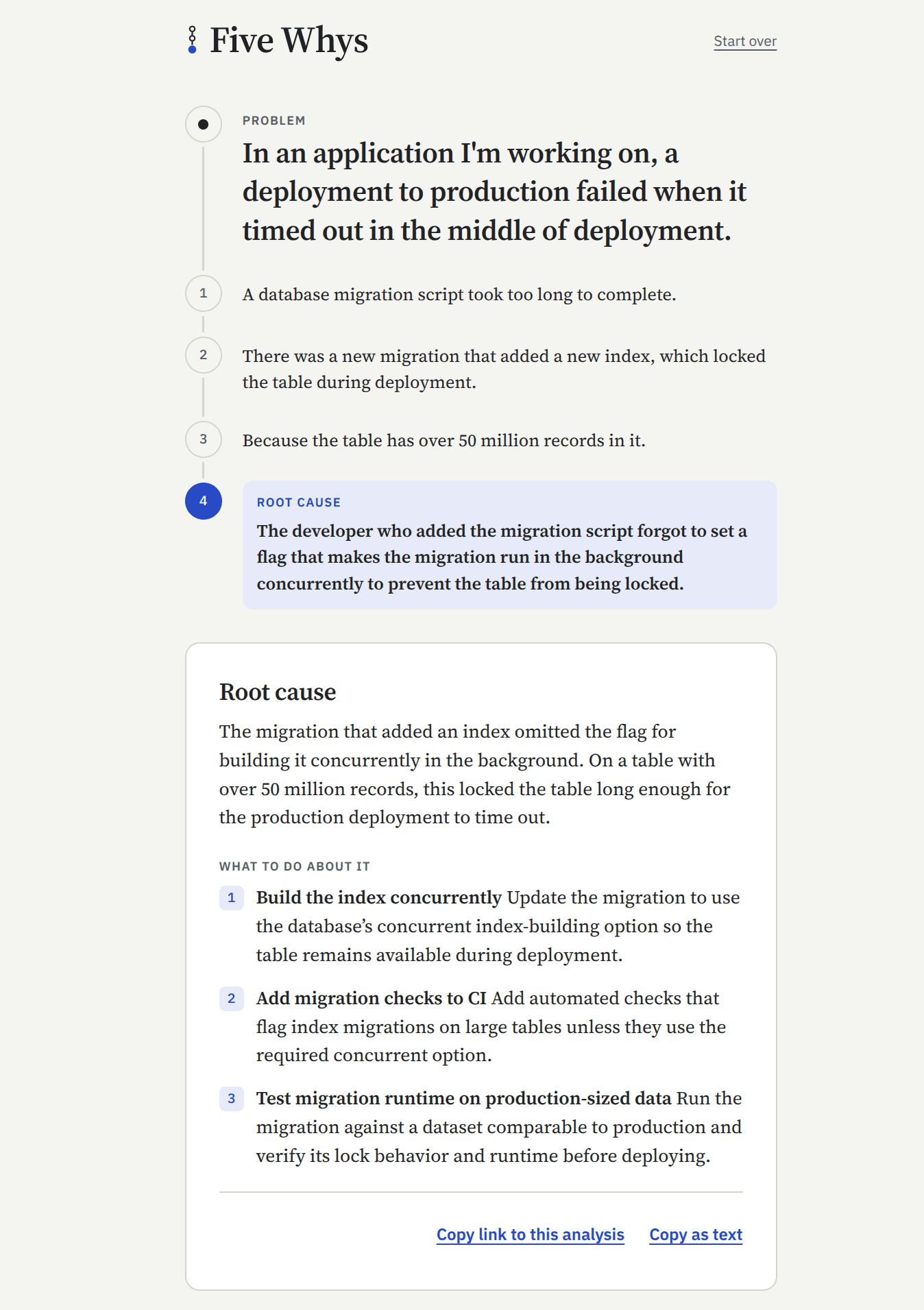
In total, the entire process took mere seconds and cost a small fraction of a penny. It’s always interesting to see how inexpensive these types of workflows can be once you have a firm understanding of how to set them up. However, this successful example was the result of a lot of iteration from me to get Jev to return a probability value that was reasonable and gave me confidence that it would do the job this app is supposed to do.
The Evolution of a Jev Request
In my brief time using Jev and based on how I’ve seen others use the model, I realized how important it is to set up your questions and state to get reliable results. This statement is true with all AI usage, but it’s especially important with decision-making models since they only return scores or choices, but little other context. With a conversational LLM like GPT-6, you can ask to see its reasoning behind the final answer, but Jev doesn’t provide any of this. If you get unexpected results from Jev, it’s usually because you didn’t give it the proper details it needs.
For the Five Whys app, I went through a few cycles of setting up my requests to Jev and tweaking them based on the returned scores. I quickly learned that small changes in what you send to Jev (and any other AI service) can go a long way in helping you trust its responses.
Attempt #1: Keep it simple
For my first iteration, I did what I typically do when working with any AI model. I kept my instructions short and to the point without any extra details that might have been unnecessary to include. Many times, AI models don’t produce the best output if you give them too much info, since anything you include in your prompts can be contradictory or confusing to the LLM.
I gave the Jev request simple instructions asking if the most recent answer identified a root cause. I also set the state with the problem statement, plus an array of strings containing all the “Why?” responses given to the application:
{
  "model": "typesafe/jev-1.13",
  "state": {
    "problem": "Our weekly release keeps slipping by two or three days.",
    "whys": [
      "QA finds blocking bugs late in the week.",
      "Most features are merged on Thursday, a day before the release.",
      "Developers can't start building until design signs off, which usually happens mid-week.",
      "Our sprint process has no deadline for design sign-off, so it slips whenever designers are busy.",
      "When we set up the sprint process, we only scheduled development and QA time, not design.",
      "We copied the sprint template from an older team that had no designers."
    ]
  },
  "questions": {
    "root_cause": {
      "type": "noul",
      "instructions": "Does the most recent answer identify a root cause: a process, system, or decision that could be changed, rather than another symptom?"
    }
  }
}
Using this query gave me some sensible-looking results at first glance. My first couple of informal tests that I did on the app would find a root cause to the problem given (as shown in the example request above), or would not find one when I intentionally fed it bad information. However, when I began to put the model under additional scrutiny, I noticed the probability values were typically below what I would have scored them myself. For instance, in the example above, the root cause could be determined at an earlier “Why?”, but I had to make a few additional requests before Jev sent a probability value above the threshold.
After analyzing why Jev seemed to work in some cases and not others, I found it was due to me not sending the proper context that Jev needs to work at its best. In this case, I wasn’t telling Jev to take the whole chain of responses into consideration when making its judgment, so it lost any previous information that the “Five Whys” technique needs to work well. If it only checks the last response, that response could be a restatement of the original problem or not answer the problem at all.
Attempt #2: Give it as much info as you can
Seeing that my lack of context was giving me unreliable responses, my instinct for my second revision of the Jev requests was to expand the request further. I tweaked the instructions to ask Jev to read all the “Why?” answers in order, and continued to give it the problem statement and “Why?” responses in the state. My expectation was to give it whatever I had and make my request more explicit so Jev uses all this information to make its analysis:
{
  "model": "typesafe/jev-1.13",
  "state": {
    "problem": "Our weekly release keeps slipping by two or three days.",
    "whys": [
      "QA finds blocking bugs late in the week.",
      "Most features are merged on Thursday, a day before the release.",
      "Developers can't start building until design signs off, which usually happens mid-week.",
      "Our sprint process has no deadline for design sign-off, so it slips whenever designers are busy.",
      "When we set up the sprint process, we only scheduled development and QA time, not design.",
      "We copied the sprint template from an older team that had no designers.",
      "Nobody reviewed the template when the new team was formed.",
      "The team was put together in a hurry to hit a launch date.",
      "Leadership wanted the launch out before the end of the quarter.",
      "The company sets all of its goals by quarter."
    ]
  },
  "questions": {
    "root_cause": {
      "type": "noul",
      "instructions": "Reading the answers in order as a chain of causes leading down from the problem, does the most recent answer, or an earlier answer it restates, identify a root cause: a process, system, or decision that could be changed and would prevent the original problem, rather than another symptom?"
    }
  }
}
When I began testing, I noticed almost immediately that it worked worse than my first attempt. No matter how much context I gave it, probability values returned by Jev hovered around 0.6. This score is under the application’s threshold that I gave it, so Jev was telling me “You’re not there yet, keep going” and almost never reached a root cause conclusion, even for the tests from my initial attempt that had reached one. Seeing this baffled me, as I expected that with more details, the AI model would give me better results.
Since Jev doesn’t offer the rationale behind the scores it gives back, I can only guess that my query stacked on too much information, causing a bit of internal confusion and driving it away from the clearer “yes” or “no” response that this kind of application needs. The main reason for this, I realized, is that I didn’t tell Jev what constitutes a “yes” or “no” response to the information I gave it, so it made a best-effort attempt in the absence of any details.
Attempt #3: Finally using Jev the right way
I spent some more time reading through the documentation to figure out better ways to configure my request to Jev, and I realized I was missing some key details that would steer it towards a better result, as well as misusing the existing information I sent over to the request.
My first mistake was that I crammed everything that I could into the instructions key sent over to the Jev request. The instructions should only contain the specific query that you want evaluated using the given data under state. Giving it too much information, I’m sure, confused the underlying model and yielded the inconsistent and flatlined probability scores that I was getting in my previous iterations of the API request.
The other mistake, and possibly the main issue behind my poor results, is that I wasn’t giving Jev any details about what amounts to a “yes” or “no” for the evaluation. Jev accepts an optional criteria key for the noul type requests we’re making in the app, which it uses as the definitions we want for our response. For the “yes/no” type of question that we’re sending over, I needed to give it clearer information for it to use when scoring the request. Without it, I was leaving it up to Jev to guess what I wanted, and AI models aren’t mind-readers.
One last tweak that I made is that I changed the “Why?” responses I was sending as part of the state from an array of strings to an array of objects indicating the explicit order of each answer given by the user in the application. Even though I was telling Jev to read the answers in order, that doesn’t guarantee that the AI will always follow those instructions, and we don’t know how it reads this information. Giving it an explicit numerical order serves as a signal to Jev that these were the steps taken. We still can’t guarantee that Jev will always follow the order, but the added contextual information gives us a better chance at having it follow the exact order that we want.
The updated request with these changes now looks like the following:
{
  "model": "typesafe/jev-1.13",
  "state": {
    "problem": "Our weekly release keeps slipping by two or three days.",
    "why_chain": [
      { "step": 1, "answer": "QA finds blocking bugs late in the week." },
      { "step": 2, "answer": "Most features are merged on Thursday, a day before the release." },
      { "step": 3, "answer": "Developers can't start building until design signs off, which usually happens mid-week." },
      { "step": 4, "answer": "Our sprint process has no deadline for design sign-off, so it slips whenever designers are busy." }
    ]
  },
  "questions": {
    "root_cause": {
      "type": "noul",
      "instructions": "The most recent answer names a root cause of the problem.",
      "criteria": {
        "true": "It, or an earlier answer it restates, names something that can be changed (a process, habit, belief, decision, or missing safeguard) and changing it would stop the original problem.",
        "false": "It names another symptom, a vague or unchangeable cause such as luck or \"life\", or a cause that no longer explains the original problem."
      }
    }
  }
}
Once I began testing this, I immediately noticed the improvements in the application. For my example query shown in the request above, it managed to hit the root cause earlier than in my first attempt, giving the request a relatively high probability value of 0.88. It also scored the request one step earlier lower (0.51), where it had previously landed just under the threshold (0.71). Further testing gave me the confidence that the requests to Jev were in a solid spot to deploy.
Working With AI Is Always a Crapshoot
With the probabilistic nature of AI, the lesson here is that the responses from these services are never a guarantee, and as developers and users of AI, we should never expect them to be. It’s the same reason AI-generated code needs a review before it ships. Sometimes it’s easy to forget this truth, and it’s even easier to forget with models that return simpler, structured responses like Jev. Since the only response is a number between 0 and 1, we can get duped into thinking we don’t need to spend time tweaking and massaging our prompts to get better responses.
Working through the Five Whys application gave me a good example of the importance of using AI models in the right way to get the best possible results. This article talks about Jev, but the same applies to any other AI model out there. It also shows why you need evals whenever you develop features that use these systems, whether that’s using AI as a judge or regular human spot-checks. Every single service reacts differently to what you give it, and you need to keep measuring and tweaking your prompts.
As for all those mentions of Jev on social media, I think the praise is earned. It’s as fast and as cheap as people say it is. What I didn’t see mentioned as often is how much the request you send affects the scores you get back, and that part is on you.
Not sure if you can trust your app's AI responses?
If you're adding Jev or another AI model to your Rails app and the results aren't what you expected, book a call and tell me what you're seeing. I'll help you figure out what your requests are missing and how to measure whether your changes work.